Donut pixel art
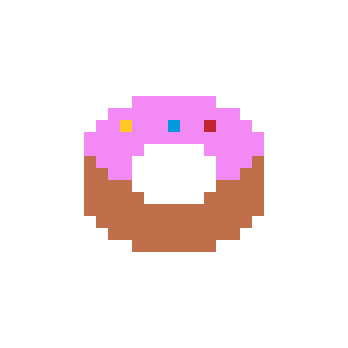
Free Donut pixel art template, 29 × 29 px in 5 colours. Copy it row by row, download it as a sharp PNG or open it in the pixel art editor.
The template
Download PNG
- 29 × 29 px
- Size
- 136
- Pixels
- 5
- Colours
- Easy
- Difficulty
How to draw it row by row
Rows are numbered from the top. Each run tells you how many pixels of one colour to place before switching; empty runs stay transparent.
- Row 129 empty
- Row 229 empty
- Row 329 empty
- Row 429 empty
- Row 529 empty
- Row 629 empty
- Row 729 empty
- Row 829 empty
- Row 911 empty7 × Orchid Pink11 empty
- Row 109 empty11 × Orchid Pink9 empty
Show all 29 rows
- Row 118 empty2 × Orchid Pink1 × Golden Yellow3 × Orchid Pink1 × Azure2 × Orchid Pink1 × Red3 × Orchid Pink8 empty
- Row 127 empty15 × Orchid Pink7 empty
- Row 137 empty5 × Orchid Pink5 empty5 × Orchid Pink7 empty
- Row 147 empty1 × Copper3 × Orchid Pink7 empty3 × Orchid Pink1 × Copper7 empty
- Row 157 empty2 × Copper2 × Orchid Pink7 empty2 × Orchid Pink2 × Copper7 empty
- Row 167 empty4 × Copper7 empty4 × Copper7 empty
- Row 177 empty5 × Copper5 empty5 × Copper7 empty
- Row 187 empty15 × Copper7 empty
- Row 198 empty13 × Copper8 empty
- Row 209 empty11 × Copper9 empty
- Row 2111 empty7 × Copper11 empty
- Row 2229 empty
- Row 2329 empty
- Row 2429 empty
- Row 2529 empty
- Row 2629 empty
- Row 2729 empty
- Row 2829 empty
- Row 2929 empty

Frequently asked questions
How big is the Donut pixel art?
It is 29 pixels wide and 29 tall — 136 filled pixels in 5 colours. Exported at 8× it becomes a 232 × 232 px PNG.
Can I use it in a game or as an avatar?
Yes. Download the transparent PNG at the scale you need and drop it into your project; the templates are free for personal use.
Can I change the colours?
Open it in the pixel art editor, pick any of the 64 colours and repaint, then export it again at any scale.
Can I make it with fuse beads?
Yes — the same grid works as a bead pattern with a bead list for every brand. Use “Make it with beads”.